
Monthly
Performance
Report

Created on

Mar 26, 2026

Completed on

Apr 22, 2026

Signed by

Daniel Reyes

QA Engineer

Report Summary

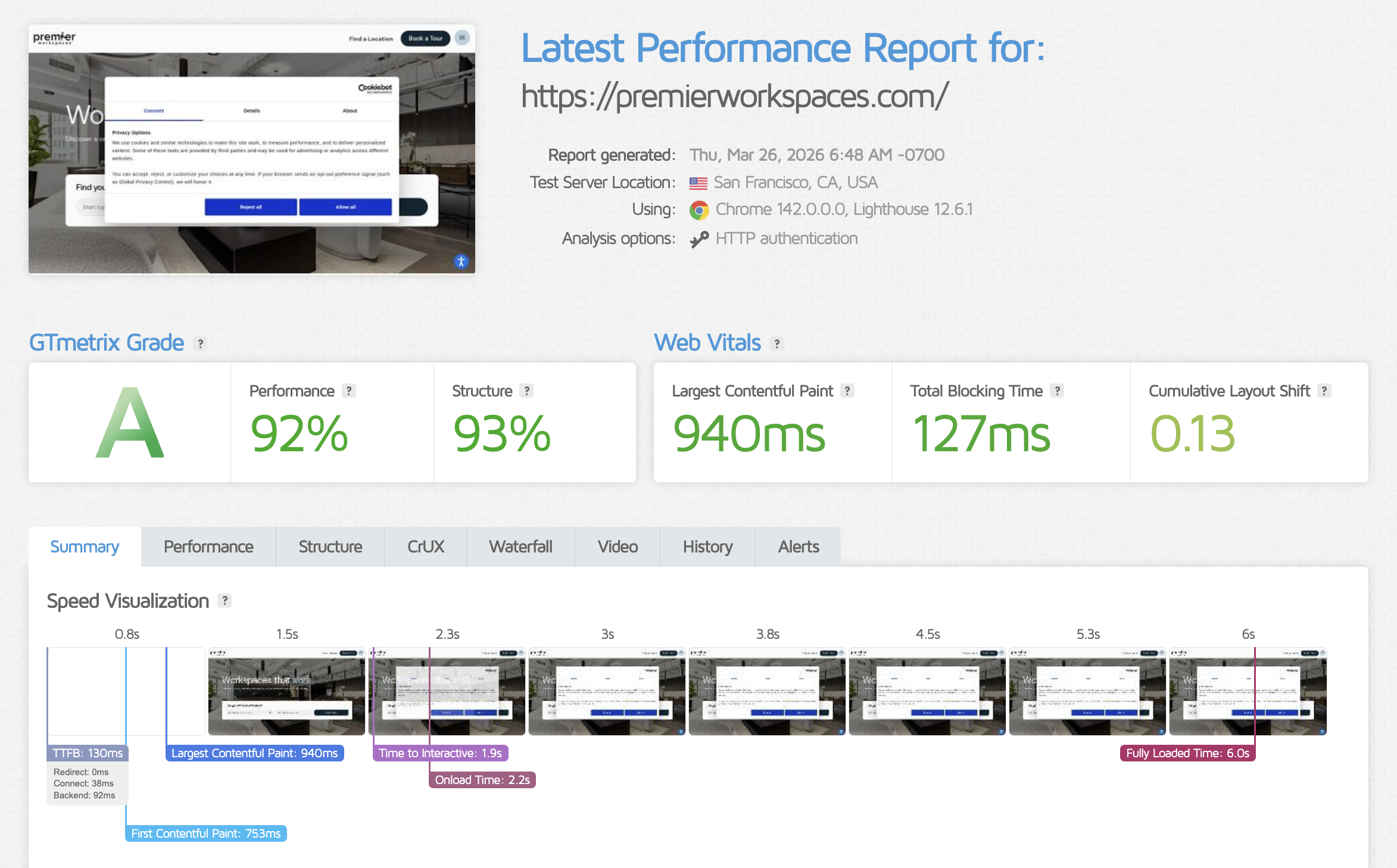
Performance — Grade: A
Forms — submission, email reply & reCAPTCHA OK
Analytics — GA4, & GTM active
404 errors — no broken links or console errors
Core pages — homepage & contact rendering OK
Cookie consent — banner visible & functional

This report was signed by

Daniel Reyes,

QA Engineer,

on

Wednesday,

April

22

2026 at 08:39 AM.

Performance Reports

The following performance and structure tests were conducted using the industry-leading tool, GTMetrix.
Checklists

Verify Submission
This process ensures that the form submission data is correctly received and processed.
passed
Verify Email Reply
This process checks that the email reply function is working correctly.
passed
Verify reCaptcha
This process verifies the functionality of the reCaptcha integration on forms.
passed
Verify UTM's Fields
This process checks if UTM parameters are captured correctly in the form fields.
passed
Verify Forms Fields IDs
This process ensures that the field IDs in forms match the expected IDs.
passed
Form Active Status
This process ensures that the subscription form is active and available for users to fill and submit. It checks whether the form is visible and functioning on the website.
passed
Form Submission Working
This process checks whether the subscription form is successfully submitting data to the backend without errors. It ensures the form can be submitted properly by users.
passed
Email Notification Triggered
This process verifies that the email notification is triggered after a successful subscription. It checks whether the email is sent to both the user and the admin.
passed
Google Analytics
Verify whether Google Analytics is installed, tracking correctly, and capturing data on all required pages.
passed
Google Tag Manager
Check if Google Tag Manager is set up and managing tags, triggers, and variables as expected.
passed
LinkedIn Pixel
Confirm that the LinkedIn Pixel is installed and tracking user interactions, if applicable.
Facebook Pixel
Ensure that the Facebook Pixel is installed, configured, and tracking events such as page views, conversions, etc.
Hubspot Pixel
Ensure that the Hubspot Pixel is installed, configured, and tracking events such as page views, conversions, etc.
reCaptcha Status
Check and verify whether reCaptcha is installed and functioning correctly on all required forms.
passed
reCaptcha Version
Verify which version of reCaptcha (v2, v3, invisible) is installed and whether it is correctly integrated with the forms.
passed
Form Integration
Ensure that reCaptcha is correctly integrated into all required forms, preventing bot submissions without interfering with user experience.
passed
Error Handling
Check if proper error messages are displayed when reCaptcha validation fails, and verify that it doesn't block legitimate users from submitting the form.
passed
404 Errors
Check the website for any 404 errors, ensuring that all pages are accessible and no broken links are present.
passed
Console Errors
Check the browser's developer tools for any console errors, including JavaScript errors, warnings, or missing resources.
passed
Broken Links
Ensure that all internal and external links are working properly and there are no broken links leading to 404 pages.
passed
Error Handling
Verify that any 404 error pages have proper redirection or custom messages, ensuring a better user experience.
passed
Core Pages
List down the core pages of the website and verify their response codes using Screaming Frog or similar tools. Check for any UI or functionality issues on these pages.
passed
Homepage Status
Check the homepage for its response code and any UI issues observed during the review.
passed
Contact Us Status
Check the Contact Us page for its response code and any minor or major issues observed during the review.
passed
Cookie Consent Banner
Verify the presence of the cookie consent banner on the website, ensuring it appears correctly and is visible to users on their first visit.
passed
Cookie Banner Functionality
Ensure that the cookie consent banner is fully functional, allowing users to accept or decline cookies as expected. Confirm that user preferences are respected after interaction with the banner.
passed
CookieYes or Cookie Consent Settings
Check whether CookieYes or any other cookie consent tool is configured correctly in terms of displaying the banner and recording user consent.
passed
Cookie Preferences Stored
Verify that the user’s cookie preferences (accept/decline) are being stored correctly and applied to subsequent site visits.
passed

Additional Tests

Plugins and Themes

Plugins

Hello Elementor
Previous Version: 3.4.6
Current Version: 3.4.7

Themes

Web Accessibility by accessiBe
Previous Version: 2.12
Current Version: 2.13
All-in-One WP Migration and Backup
Previous Version: 7.102
Current Version: 7.103
Elementor
Previous Version: 3.35.2
Current Version: 3.35.9
Image Optimizer - Compress, Resize and Optimize Images
Previous Version: 1.7.2
Current Version: 1.7.3

JetFormBuilder
Previous Version: 3.5.6.1
Current Version: 3.5.6.3
Rank Math SEO
Previous Version: 1.0.263
Current Version: 1.0.266.1
Uncanny Automator
Previous Version: 7.0.0.3
Current Version: 7.1.0.1
WP Rollback
Previous Version: 3.0.11
Current Version: 3.1.0
JetElements For Elementor
Previous Version: 2.8.0.2
Current Version: 2.8.1.1
JetEngine
Previous Version: 3.8.4
Current Version: 3.8.6.2
JetPopup
Previous Version: 2.0.20.3
Current Version: 2.0.21.1
JetSmartFilters
Previous Version: 3.7.3
Current Version: 3.7.5
JetTabs For Elementor
Previous Version: 2.2.13
Current Version: 2.2.14
Elementor Pro
Previous Version: 3.35.0
Current Version: 3.35.1
All-in-One WP Migration Pro
Previous Version: 1.35
Current Version: 1.36
Permalink Manager Pro
Previous Version: 2.5.2.4
Current Version: 2.5.3.2
Maintenance Report – March 2026
Premier Workspaces logo on blue background
Maintenance Report – March 2026
Book a meeting room
Already have an account?
If not, book as a guest!